colormapsdocs
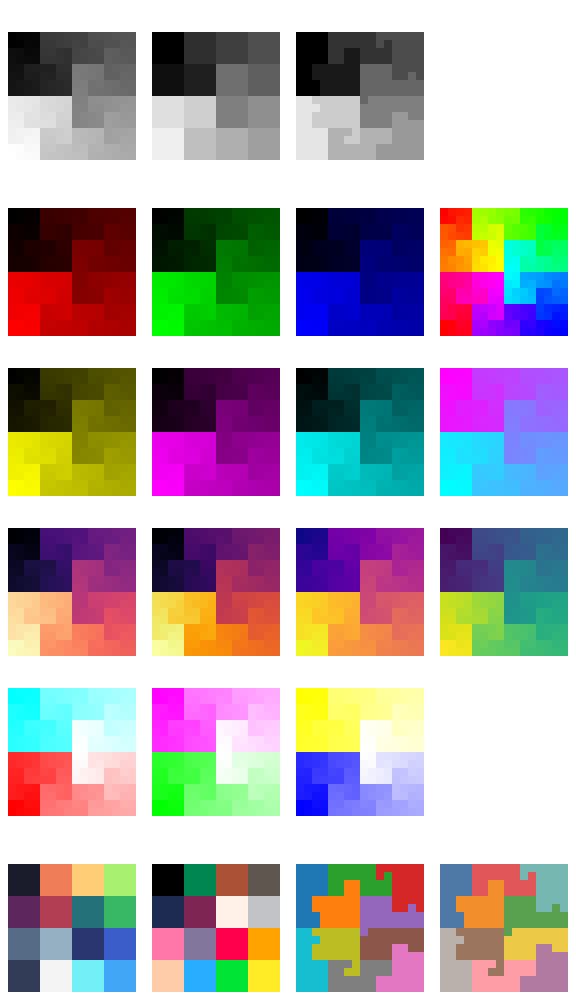
A collection of pre-defined colormaps. They generally come in three flavours:
- Continuous colormaps: Functions of type
float[...] -> uint8[..., 3]. They turn a batch of floats in the range [0.0, 1.0] into a batch of RGB triples. - Discrete colormaps: Functions of type
int[...] -> uint8[..., 3]. They turn a batch of integer indices into a batch of RGB triples by indexing into the color palette. - Vector colormaps: Functions of type
complex[...] -> uint8[..., 3]. They turn a batch of plane vectors, spelled as complex numbers or as pairs, into a batch of RGB triples, giving the direction and the magnitude their own dimension of the colour.
ContinuousColorMap = Callable[[ArrayLike], np.ndarray]
:
source
docs
A colormap over a continuous range, float[...] -> uint8[..., 3].
Turns a batch of floats in the range 0.0 to 1.0 into a batch of RGB triples of the same shape.
DiscreteColorMap = Callable[[ArrayLike], np.ndarray]
:
source
docs
A colormap over a fixed palette, int[...] -> uint8[..., 3].
Turns a batch of integer indices into a batch of RGB triples of the same shape, by indexing into the palette.
VectorColorMap = Callable[[ArrayLike], np.ndarray]
:
source
docs
A colormap over the plane, complex[...] -> uint8[..., 3].
Turns a batch of plane vectors into a batch of RGB triples of the same shape. A vector may be spelled as a complex number or as the last axis of a real array of length two; the two spellings mean the same thing.
ColorMap = ContinuousColorMap | DiscreteColorMap | VectorColorMap
:
source
docs
Any kind of colormap: continuous, discrete, or vector.
reds(x: ArrayLike) -> np.ndarray
:
source
docs
Red colormap. Simply embeds greyscale value into red channel.
greens(x: ArrayLike) -> np.ndarray
:
source
docs
Green colormap. Simply embeds greyscale value into green channel.
blues(x: ArrayLike) -> np.ndarray
:
source
docs
Blue colormap. Simply embeds greyscale value into blue channel.
yellows(x: ArrayLike) -> np.ndarray
:
source
docs
Yellow colormap. Simply embeds greyscale value into red and green channels.
magentas(x: ArrayLike) -> np.ndarray
:
source
docs
Magenta colormap. Simply embeds greyscale value into red and blue channels.
cyans(x: ArrayLike) -> np.ndarray
:
source
docs
Cyan colormap. Simply embeds greyscale value into green and blue channels.
divreds(x: ArrayLike) -> np.ndarray
:
source
docs
Diverging red/cyan colormap. Uses greyscale value to interpolate between cyan (0.0) and white (0.5) and red (1.0).
divgreens(x: ArrayLike) -> np.ndarray
:
source
docs
Diverging green/magenta colormap. Uses greyscale value to interpolate between magenta (0.0) and white (0.5) and green (1.0).
divblues(x: ArrayLike) -> np.ndarray
:
source
docs
Diverging blue/yellow colormap. Uses greyscale value to interpolate between yellow (0.0) and white (0.5) and blue (1.0).
cyber(x: ArrayLike) -> np.ndarray
:
source
docs
Cyberpunk colormap. Uses greyscale value to interpolate between magenta (0.) and cyan (1.).
rainbow(x: ArrayLike) -> np.ndarray
:
source
docs
Rainbow colormap. Effectively embeds greyscale values as hue in HSV color space.
magma(x: ArrayLike) -> np.ndarray
:
source
docs
Magma colormap by Nathaniel J. Smith and Stefan van der Walt (see https://bids.github.io/colormap/).
Discretised to 256 8-bit colours.
inferno(x: ArrayLike) -> np.ndarray
:
source
docs
Inferno colormap by Nathaniel J. Smith and Stefan van der Walt (see https://bids.github.io/colormap/).
Discretised to 256 8-bit colours.
plasma(x: ArrayLike) -> np.ndarray
:
source
docs
Plasma colormap by Nathaniel J. Smith and Stefan van der Walt (see https://bids.github.io/colormap/).
Discretised to 256 8-bit colours.
viridis(x: ArrayLike) -> np.ndarray
:
source
docs
Viridis colormap by Nathaniel J. Smith, Stefan van der Walt, and Eric Firing (see https://bids.github.io/colormap/).
Discretised to 256 8-bit colours.
sweetie16(x: ArrayLike) -> np.ndarray
:
source
docs
Sweetie-16 colour palette by GrafxKid (see https://lospec.com/palette-list/sweetie-16).
Input should be an array of indices in the range [0,15] (or else it will cycle).
pico8(x: ArrayLike) -> np.ndarray
:
source
docs
PICO-8 colour palette (see https://pico-8.fandom.com/wiki/Palette).
Input should be an array of indices in the range [0,15] (or else it will cycle).
tableau(x: ArrayLike) -> np.ndarray
:
source
docs
Matplotlib Tableau colourmap.
Input should be an array of indices in the range [0,9] (or else it will cycle).
nouveau(x: ArrayLike) -> np.ndarray
:
source
docs
Updated Tableau colourmap (more accessible).
Input should be an array of indices in the range [0,9] (or else it will cycle).
chroma(v: ArrayLike) -> np.ndarray
:
source
docs
Vector colormap: direction becomes hue, and magnitude becomes brightness.
The colour wheel starts at red for a vector along the positive x axis and turns anticlockwise through yellow, green, cyan, blue and magenta. A vector of magnitude zero is black and one of magnitude one or more is at full brightness, so a field should be scaled into the unit disc before it arrives here.
domain(z: ArrayLike) -> np.ndarray
:
source
docs
Vector colormap for domain colouring: phase becomes hue, and modulus becomes lightness, with a contour ring at every doubling of the modulus.
The colour wheel starts at red for a positive real number and turns anticlockwise through yellow, green, cyan, blue and magenta, so the six primaries mark the sixths of a turn of the phase. Lightness places the modulus on an absolute scale: a zero of the function is black, a pole is white, and the unit circle is the fully saturated colour halfway between.
Unlike a continuous colormap this one is not given its input in a fixed range, because the modulus of a complex function is part of what the picture is about. The scale is logarithmic, symmetric about one, and slow: a function's ordinary values keep their full colour, and it takes many octaves to approach either extreme. Shading over the top of it draws a dark contour ring at every power of two, so the rings count the order of a zero or a pole and their spacing shows how fast the function is growing.